Evaluation variants#
Nine gym.registered task IDs share the same LiftCubeEnvCfg base
(tasks/lift_cube_env_cfg.py) and override only single knobs. They fall into
two groups, and the distinction matters for what a comparison means.
The randomisation variants keep the scene, observations, actions and
termination terms identical and change one knob, so a success-rate difference
is attributable to that knob. The camera-set variants (-2Ext, -3Ext,
-4Ext, -6Cam) substitute the scene itself, because instantiating more
cameras is a different scene: comparing across them compares camera sets, not
one knob.
Domain-randomisation variants:
Task ID |
Change vs base |
|---|---|
|
none — in-distribution baseline |
|
cube position perturbed ± 2 cm XY, ± 10° yaw per episode |
|
visual randomisation per episode: lighting, sky-dome yaw, robot and cube colours — cube pose stays at the recorded scene state |
|
cube positions from an alternative bin map ( |
Camera-set variants (which cameras the environment instantiates):
Task ID |
Change vs base |
|---|---|
|
2 / 3 / 4 external cameras |
|
all six cameras |
|
2 external cameras combined with the OOD position grid |
python -m so101_mvbench.tools.list_envs prints the registered IDs from
the installed package.
In-distribution and out-of-distribution test regimes#
The workspace is partitioned into a grid of bins, 5 × 4 in the reference corpus. Each bin contains a 3 × 3 sub-grid of cube placements combined with three yaw rotations — 27 demonstrations per bin. Which bins enter training and which are withheld defines the test regime.
In-distribution: interpolation between seen placements#
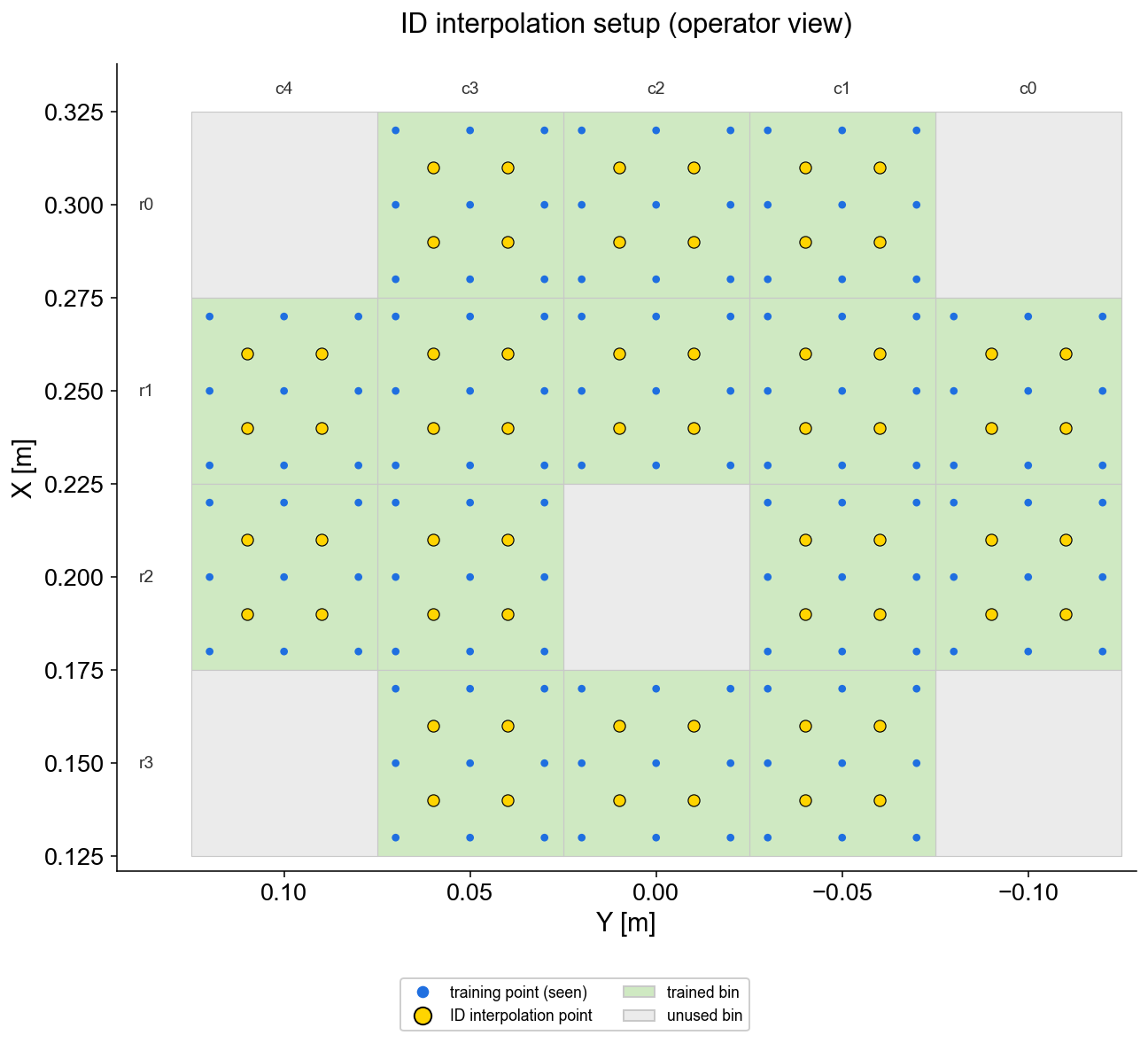
The policy is evaluated inside bins it was trained on, but at cube positions between the training placements (yellow). It has seen the surrounding region, never these exact coordinates. This measures precision within the training distribution.
Out-of-distribution: withheld bins#
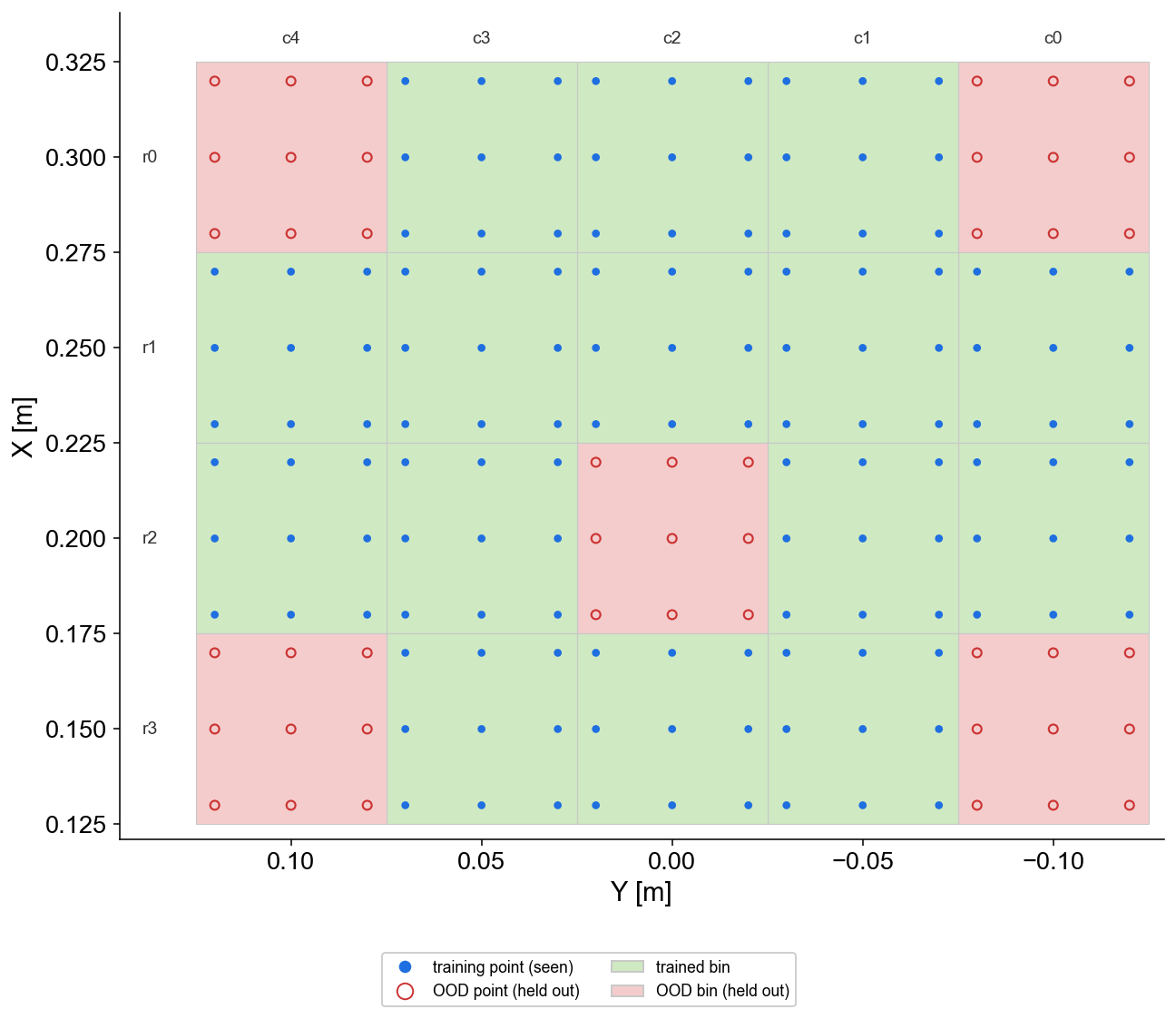
Entire bins (red) are excluded from training and evaluated afterwards. Success there measures spatial generalisation. The withheld set spreads over corners and interior, so extrapolation beyond the trained area and gaps inside it are both covered.
Both grid figures are plotted in the world frame of the scene the corpus was recorded in, so their axes carry that scene’s absolute coordinates. What they show is the grid geometry: in another scene the same bins sit at the same place relative to the workspace frame, at different world coordinates (Coordinate frames).
Both regimes use the same policy, checkpoint, and protocol — only the
evaluated bins differ. The -OOD-Position task variant is orthogonal to
the bin split: it moves the cube to unseen positions within an episode
schedule, while the bin split changes which workspace regions were ever in
the training data.
Adding a new variant#
Subclass the base config with the knob you want, then register a task ID
for it in tasks/__init__.py, following the existing entries:
# in tasks/lift_cube_env_cfg.py
@configclass
class LiftCubeOodMyKnobEnvCfg(LiftCubeEnvCfg):
    cube_noise_m: float = 0.03

# in tasks/__init__.py
gym.register(
    id="LiftCube-Sim-OOD-MyKnob",
    entry_point=_ENTRY_POINT,
    disable_env_checker=True,
    kwargs={"env_cfg_entry_point": f"{__name__}.lift_cube_env_cfg:LiftCubeOodMyKnobEnvCfg"},
)
The evaluator reads the knobs from the parsed env config — no new
command-line flags are needed. Select the variant with --task.
Warning
-OOD-Position and -2Ext-OOD-Position are registered but not usable as
shipped. Both name binmap_ood.json, which no file in this repository provides
and which nothing generates, and the evaluator reads binmap.json from the
dataset root rather than the config’s binmap_name. Selecting either task
gives you the camera set it names and the ordinary bin map, not an
out-of-distribution grid.
Making it work is a three-part change: ship or generate the alternative bin
map, have async_eval honour binmap_name, and say how the OOD positions are
derived from the trained ones. It is not a flag.