What happens when the external camera moves?#
An external camera in the real world does not stay where you put it. It gets bumped, remounted, or rebuilt from a photograph of the last setup. A policy trained at one viewpoint and evaluated at a slightly different one is therefore the normal case, not an exotic one.
This experiment measures how much that costs. The policy is trained once and evaluated at viewpoints it never saw, a few degrees at a time.
The top camera swept along the front-back meridian, in five degree steps. The green frame in the middle of the sweep is the pose the policy was trained on, and the colour of each frame marks how far that view is from it. The change from one step to the next is small. Whether the policy notices is the question.
The second meridian is the same sweep turned ninety degrees, so the camera moves sideways across the workspace instead of along it:
Both sweeps start and end at the same top-down pose, which is why a drift measurement needs the direction as well as the magnitude. Ten degrees toward the front is a different picture than ten degrees toward the left.
How it works#
A viewpoint is three numbers in the scene configuration: azimuth around the
workspace, elevation above it, and radius from its centre. Drift is a copy of
that configuration with one of the numbers changed, and evaluation with
--scene_config pointing at the copy.
Nothing else changes. The recorded starting conditions, the seed, the episode count and the checkpoint stay identical, so the difference in success rate is attributable to the viewpoint.
Note
Only the external cameras can drift. The wrist camera is mounted on the gripper and moves with the arm by definition, so it has no hemisphere position to change.
The pole problem, and up_world#
Sweeping a camera along a meridian, meaning upward in elevation towards the top of the hemisphere, has a trap. The camera’s roll is normally derived from the stage’s up-axis, and that derivation becomes undefined as the camera approaches the pole. The image then rolls discontinuously part-way through a sweep, and a success-rate drop that looks like sensitivity to elevation is really a picture that suddenly rotated.
CameraSpec therefore takes an optional fixed world up-vector:
"front": {
  "type": "external",
  "azimuth_deg": 0,
  "elevation_deg": 60,
  "radius_m": 0.4,
  "up_world": [0.0, 0.0, 1.0]
}
With up_world set, the roll is derived from that constant instead, and the
camera tilts continuously all the way to the pole. Set it on every camera you
intend to sweep in elevation. Leaving it out keeps the original behaviour,
which is fine for azimuth-only drift.
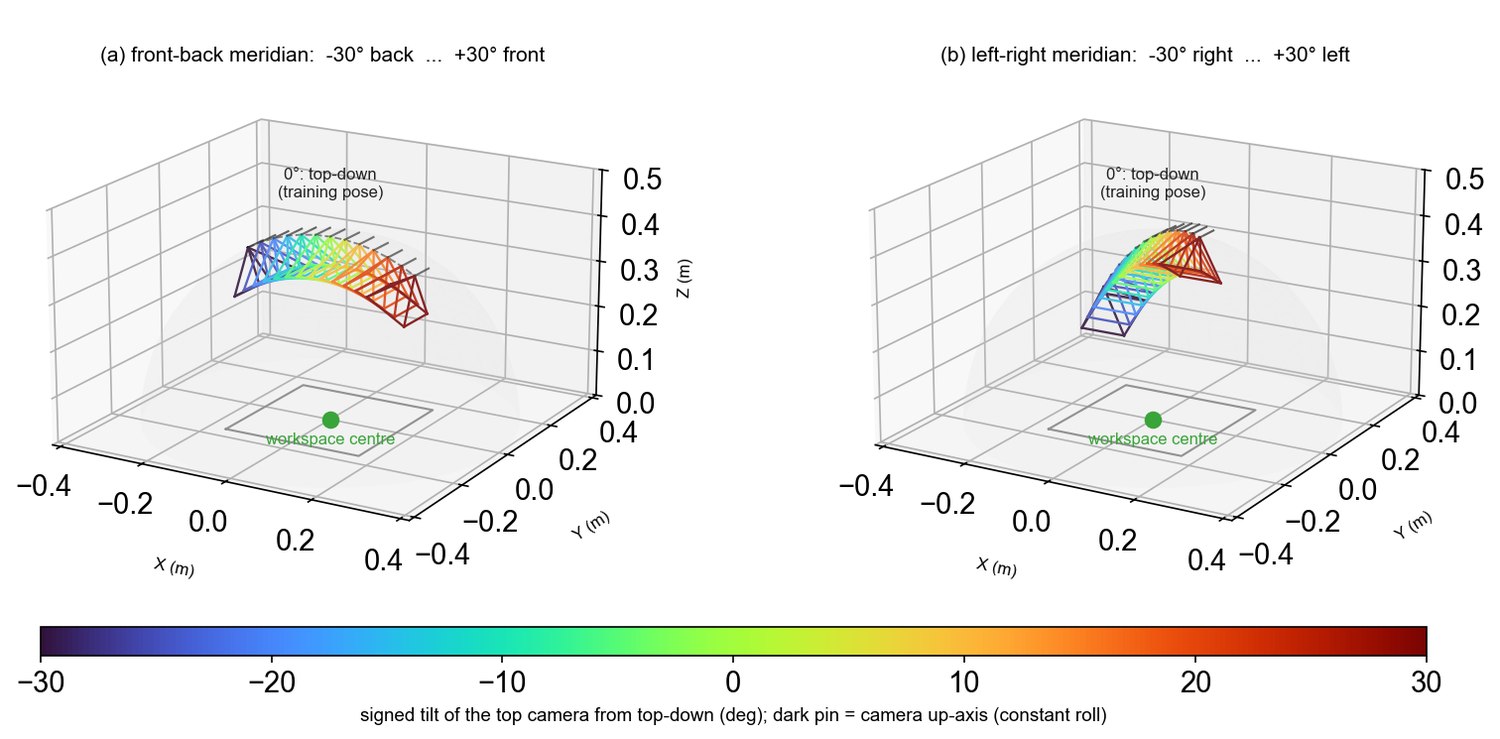
The sweep drawn out, along two meridians from the top-down training pose. The short pin at each position is the camera’s up-axis, and it stays parallel across the whole arc. That is what a fixed up-vector buys: the image tilts, and it does not roll.
Running it#
Start from the configuration the policy was trained with. One command writes one copy per offset, with a single number changed in each:
# adjust: the camera under test and how far it drifts
CAM=front
SCENE=src/so101_mvbench/tasks/scene_configs/lift_cube_6cam.json
VARIANTS=configs/drift

python -m so101_mvbench.tools.drift_configs \
    --scene_config "$SCENE" --camera "$CAM" \
    --axis azimuth --offsets=-15,-10,-5,5,10,15 \
    --output_dir "$VARIANTS"
It prints the camera’s trained value first, so you can see what the offsets
are measured against, then one line per file written. The offsets need the
equals sign, because a bare -15 would be read as a flag.
An elevation sweep is the same command with a different axis, plus the fixed up-vector from the section above:
# adjust: the same scene config, and where the elevation sweep goes
SCENE=src/so101_mvbench/tasks/scene_configs/lift_cube_6cam.json

python -m so101_mvbench.tools.drift_configs \
    --scene_config "$SCENE" --camera top \
    --axis elevation --offsets=-30,-20,-10,10,20,30 \
    --up_world 0,0,1 --include_baseline \
    --output_dir configs/drift_top
--include_baseline also writes the unchanged configuration, so the reference
run lives in the same directory as the sweep. The third axis is radius, in
metres.
Then evaluate the same checkpoint against each variant:
# adjust: the policy, the bin, the variants written above, and where results go
CKPT=outputs/2cam_wrist_front/checkpoints/065000/pretrained_model
BIN=datasets/01_raw_gamepad/bin_c2_r2
VARIANTS=configs/drift
OUT=outputs/2cam_wrist_front/camera_drift

for cfg in "$VARIANTS"/*.json; do
    name=$(basename "$cfg" .json)
    python -m so101_mvbench.evaluation.async_eval \
        --mode async --num_envs 10 --num_episodes 27 \
        --policy_path "$CKPT" --scene_config "$cfg" --dataset_root "$BIN" \
        --output_dir "$OUT/$name" \
        --seed 42 --settle_steps 130 --full_report --headless
done
The un-drifted configuration is the baseline, so evaluate it the same way and
keep it in the same output tree. Generating it with --include_baseline puts
it in the loop above automatically.
Reading the result#
Plot success rate against the offset. The shape is the finding:
A flat curve over a few degrees means the policy tolerates a camera that moved, which is what you want before trusting a rebuilt rig.
A cliff means the policy memorised the viewpoint. Its success rate at the trained pose is then a measurement of that pose and nothing more.
An asymmetric curve, worse in one direction, usually points at occlusion: the arm or the cube leaving the frame on one side.
The same caution as everywhere applies. Repeat each cell with the same seed and compare the drop against the spread, because a two-point difference between neighbouring offsets is usually noise.
Warning
Check the recorded videos of a drifted run before believing a large drop. A viewpoint far enough off can put the cube outside the frame entirely, which is a different finding than the policy being sensitive to a small change.
Where to go next#
Which camera is the policy actually using? — degrading a camera instead of moving it
Camera configurations — the hemisphere these numbers live on
Stage 4 — Evaluation — the protocol these runs inherit