Stage 1 — Recording#
You drive the simulated SO-ARM101 to a cube with a gamepad, lift the cube, and send the arm back to its home pose. One such cycle is one episode. This is the only stage with a human in the loop. Everything downstream replays what you did here. It is also the stage that bounds every result later on: imprecise teleoperation cannot be repaired by more training steps or more cameras.
flowchart LR
OP[You + gamepad] -->|teleop| SIM[Isaac Sim<br/>LiftCube-Sim]
SIM -->|obs| REC[teleop_recorder]
REC -->|parquet + MP4| DS[(datasets/01_raw_gamepad/<bin>/)]
BIN[BinSpawner<br/>bin grid] --> SIM
How to use#
1. Decide which bin to record#
The cube is not placed randomly. The workspace is divided into a grid of bins, and within one bin the spawner walks a 3 × 3 sub-grid of placements combined with 3 yaw angles (0°, 22.5°, 45°), which gives 27 episodes per bin.
The grid is --spawn_n_cols × --spawn_n_rows, 5 × 5 by default. The
reference corpus used 5 × 4, so 20 bins and 540 episodes.
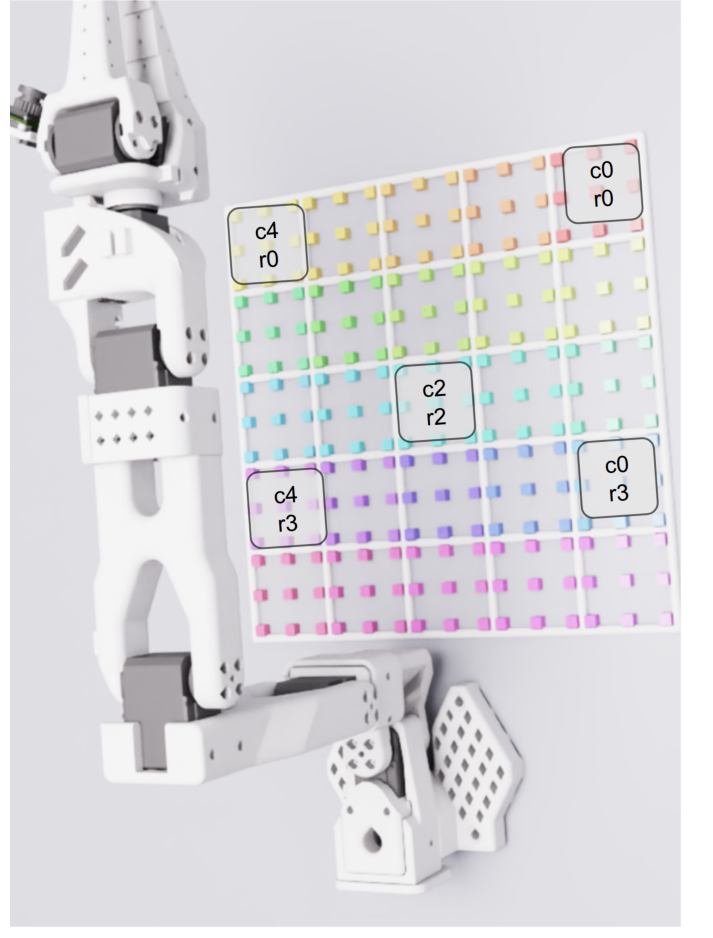
The grid rendered into the scene, with the marker colour distinguishing bins
and nothing else. Every cube in every episode lands on one of these positions.
The labels are the naming you pass on the command line: c0 is the column
furthest from the operator, r0 the row furthest from the arm.
One bin is 27 episodes, and they are not 27 random placements:
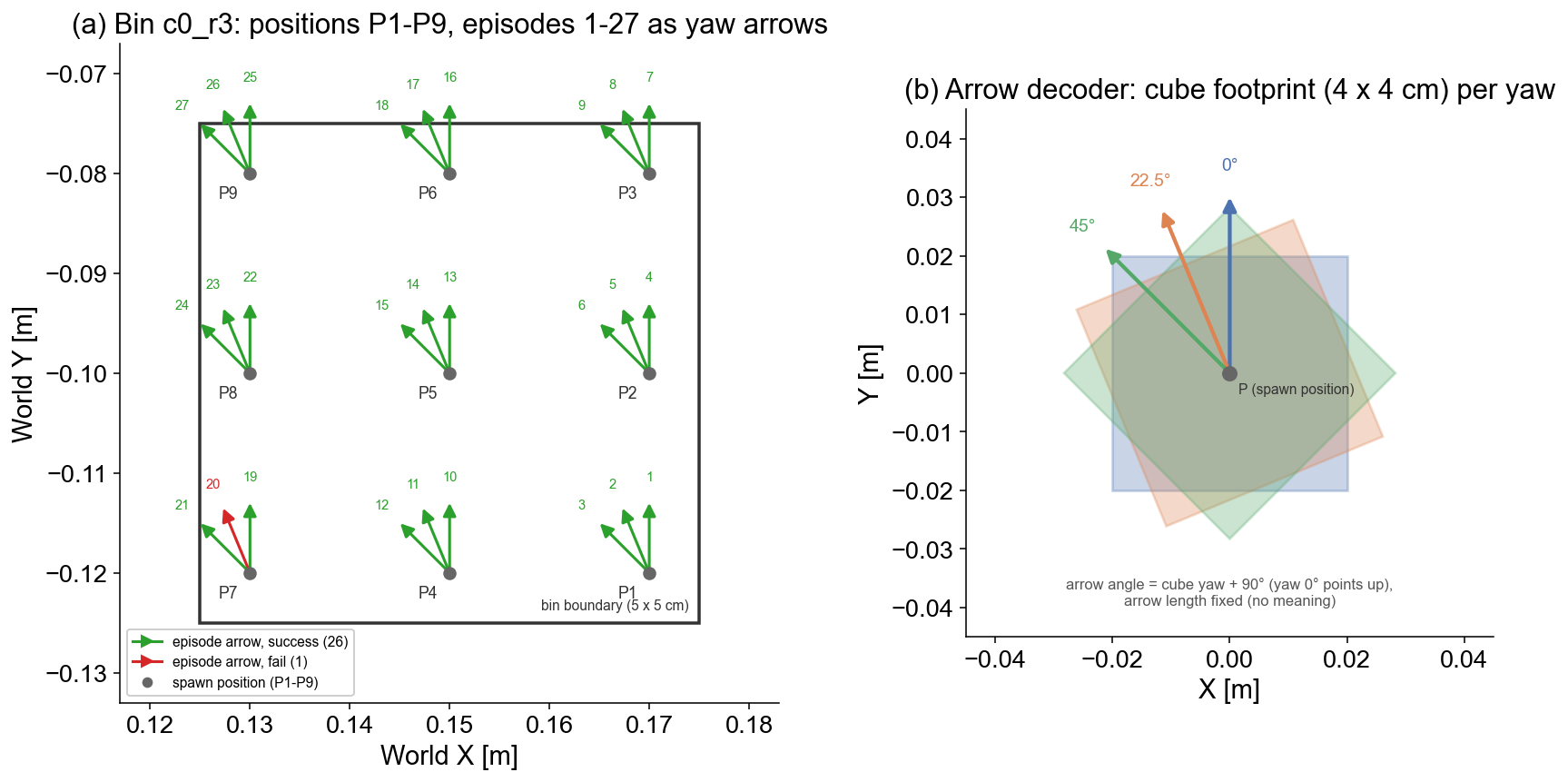
Nine positions in a 5 × 5 cm square, three cube orientations at each, drawn here for one bin of one evaluation run. The right panel decodes the arrows: each is one episode’s cube yaw, and the overlapping squares show how much the cube footprint actually turns between 0° and 45°.
Episode by episode, over the whole corpus, that looks like this from the wrist camera:
You record one bin per session and pick it by column and row:
--spawn_bins --spawn_bin_col 1 --spawn_bin_row 1
2. Start the recorder#
python -m so101_mvbench.recording.teleop_recorder \
    --task LiftCube-Sim \
    --action_source gamepad \
    --num_episodes 27 \
    --spawn_bins --spawn_bin_col 1 --spawn_bin_row 1 \
    --repo_id local/bin_c1_r1 \
    --repo_root datasets/01_raw_gamepad \
    --task_name 'lift the cube' \
    --seed 42
The recorder appends bin_c<col>_r<row> to --repo_root itself, so the
episodes land in datasets/01_raw_gamepad/bin_c1_r1/.
No gamepad at hand? --action_source sine --auto_record drives a scripted
motion instead, which is enough to check that the stage runs.
Warning
Send the simulator’s output to a file, never through a pipe:
> record.log 2>&1. A pipe gives Isaac Sim a SIGPIPE and kills it
instantly. Reading the file with tail -F afterwards is fine.
3. Drive the arm#
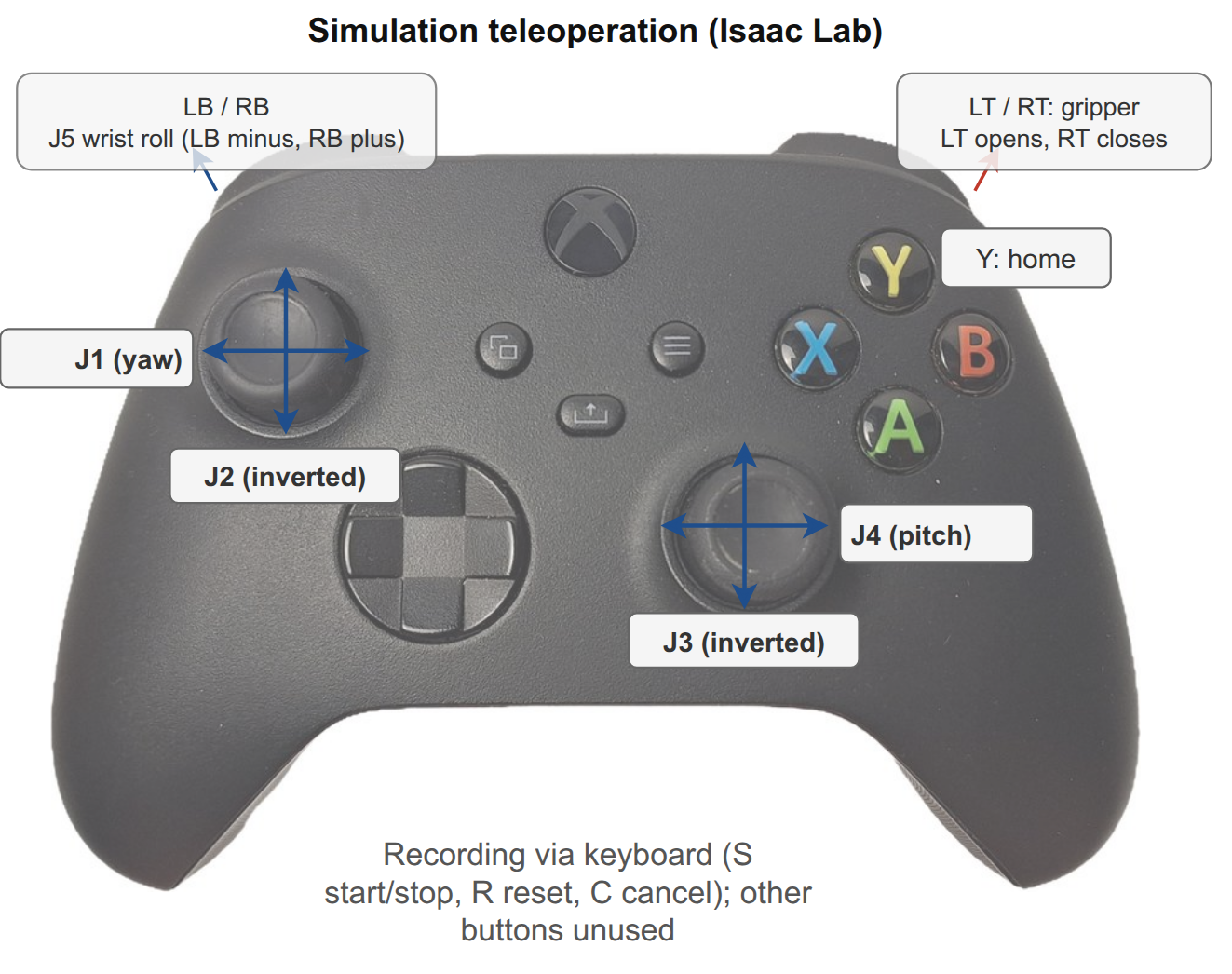
The sticks drive four arm joints, the shoulder buttons roll the wrist, the
triggers open and close the gripper. The mapping lives in
vendor/gamepad_utils/configs/so101_lerobot_teleop.json, so you can rebind it
without touching code.
4. End every episode with the home pose#
Press Y when the cube is lifted. This runs a 1.5 s glide back to the neutral pose while holding the gripper closed, so the cube does not drop.
Do this every single time. The home pose is the trajectory end the policy learns, and it is what the evaluator’s final stage checks. Episodes that stop at arbitrary poses teach the policy to stop at arbitrary poses, and the evaluation’s success criterion then measures noise.
5. Control episodes from the keyboard#
Key |
Effect |
|---|---|
|
Start, or stop, recording |
|
Reset the world (also stops recording) |
|
Cancel the running recording |
Warning
After RECORDING STOPPED appears, let the process finish on its own. Saving
runs on the simulator’s main thread and needs up to a minute or so to flush a
long episode. A kill in the middle leaves a parquet file without its footer,
and pyarrow cannot reopen it.
6. Extract the trajectories#
Stage 2 does not read the LeRobot dataset directly. It replays per-episode action trajectories, so convert them once (CPU only, no simulator):
python -m so101_mvbench.recording.trajectory_extractor \
    --dataset_root datasets/01_raw_gamepad/bin_c1_r1 \
    --output_dir   datasets/01_raw_gamepad/bin_c1_r1/trajectories
Repeating this is harmless: it overwrites the .npy files with identical
content. For all bins at once:
for bin in datasets/01_raw_gamepad/bin_c*_r*; do
    python -m so101_mvbench.recording.trajectory_extractor \
        --dataset_root "$bin" --output_dir "$bin/trajectories"
done
7. Check what you recorded#
# adjust: BIN_ID identifies the bin you recorded. It counts row-major from 1,
# so with a 5-column grid, column 1 / row 1 is 1*5 + 1 + 1 = 7
BIN_ID=7

python -m so101_mvbench.tools.validate_bin \
    --bin_id "$BIN_ID" --dataset_root datasets/01_raw_gamepad/
The tool prints which bin it resolved the ID to, so check that line before reading the verdict. It reads the parquet files, counts the MP4s, checks that every episode has a scene state, and verifies that the cube positions really fall inside that bin. It exits non-zero on failure.
One caveat at small scale: it expects two MP4s per successful episode. Very short test episodes end up sharing one video file (see below), and it then reports fewer MP4s than expected even though the recording is fine.
To watch the episodes, open them in the Rerun viewer.
It needs rerun-sdk >= 0.31 for the LeRobot v3 loader. Install that in a
separate environment if your main one pins an older version:
rerun datasets/01_raw_gamepad/bin_c1_r1/
What you get#
datasets/01_raw_gamepad/bin_c1_r1/
├── meta/
│   ├── info.json                        # LeRobot v3 dataset metadata
│   ├── episodes/chunk-000/file-000.parquet
│   └── episode_000000_scene_state.json  # one per episode, plus one look-ahead
├── data/chunk-000/file-000.parquet      # observations + actions
├── videos/observation.images.<camera>/chunk-000/   # one MP4 per episode
├── trajectories/episode_000.npy         # after step 6, plus trajectories_meta.json
└── binmap.json                          # which bin, and how far you got
Three properties of this output matter downstream:
The data says which scene it was recorded in.
binmap.jsonand everyscene_state.jsoncarryworkspace_origin_m. Replay and evaluation read that value instead of assuming a scene, which is what lets a recording be replayed somewhere else (Coordinate frames).scene_state.jsonis not optional. It holds the cube pose at episode start. Without it, replay puts the cube somewhere else and the gripper closes on empty air. Note that a finished recording holds one more of these files than it has episodes: the recorder writes the state of the upcoming episode at each reset, so the last one describes an episode that was never recorded. Count episodes frombinmap.json, not from these files.Videos are capped at 1 MB per file via
update_chunk_settings(video_files_size_in_mb=1), instead of LeRobot’s default of 200 MB. A full-length episode exceeds that cap on its own, so in practice each episode gets its own MP4 and stays individually inspectable. Very short episodes fit together and then share one file.
Settings worth knowing#
Flag |
Default |
What it does |
|---|---|---|
|
— |
Gym task ID. |
|
— |
|
|
— |
How many episodes to record (27 = one full bin). |
|
— |
Dataset ID and local root. The bin directory is appended for you. |
|
off |
Use the deterministic bin grid instead of random placement. |
|
5 / 5 / 0.05 |
Grid geometry, bin size in metres. |
|
empty |
Spawn on the out-of-distribution grid. A test mechanism: for production, record the full grid and decide the split later. |
|
cylindrical room |
Record in a different scene. The scene’s workspace origin is written into the dataset. |
--help prints the full list without booting the simulator.
When something goes wrong#
See Troubleshooting, which collects the failures of every stage in one place: a parquet that will not open, a silent console, validate_bin naming the wrong bin.
Where to go next#
Stage 2 — Assembly — turn these trajectories into multi-camera datasets
Data layout — the on-disk format in detail
Coordinate frames — how to read the positions